...
Proud to be one of only a few Georgia MSPs on the 2026 MSP 501 list. See the announcement

IT services across Metro Atlanta & North Georgia

17 locations served — click a city to see services available in your area

Local experts
Select your location

    Atlanta, GA

    Managed IT services for Atlanta businesses

    ★ Why IntegriCom

    No term contracts. Just commitment.

    Trusted IT partner for businesses across Georgia. Same-day response, senior engineers, zero lock-in.

    20+
    Years serving GA
    17
    Cities covered
    Get a free IT assessment
    678-507-0700
    Mon–Fri · 7am–6pm

    IT services across Metro Atlanta & North Georgia

    17 locations served — click a city to see services available in your area

    Local experts
    Select your location

      Atlanta, GA

      Managed IT services for Atlanta businesses

      ★ Why IntegriCom

      No term contracts. Just commitment.

      Trusted IT partner for businesses across Georgia. Same-day response, senior engineers, zero lock-in.

      20+
      Years serving GA
      17
      Cities covered
      Get a free IT assessment
      678-507-0700
      Mon–Fri · 7am–6pm

      How To Share Screen

      In a call or meeting go to the top right of teams and select “Share”
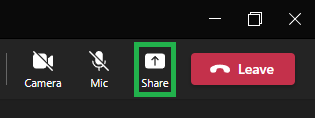
      Microsoft Teams Share Screen During Call Meeting Screenshot

      Sound and Presenter Mode

      There are two options to know before you share your screen

      Sound Options:

      If you are sharing something with audio enable “Include Computer Sound”

      Presenter Mode:

      This is how your content regardless of what you preset will show up to your attendees.
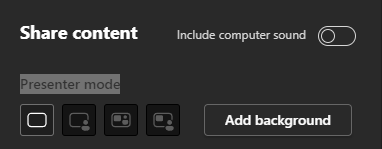
      Microsoft Teams Share Screen Presenter Mode Screehsnot

      Ways to Share in Microsoft Teams

      You will see multiple options for sharing. Screen, Window, Microsoft WhiteBoard, Content from camera, PowerPoint Live or Browse my Computer.

      Screen

      Here is where you can share any of your screens entirely. Simply select the one you want to share.
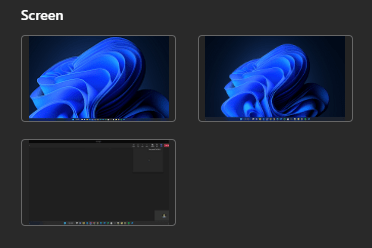
      Microsoft Teams Share Screen Screehsnot

      Window

      Window sharing is when you do not want to share your entire screen but one window or App. For example a Chrome Tab, Excel Sheet, Word Doc, etc

      Microsoft Teams Share Screen Window Screehsnot

      Microsoft Whiteboard

      This is a whiteboard that you and your attendees can draw and collaborate on.

      Microsoft Teams Share Screen Whiteboard Screehsnot

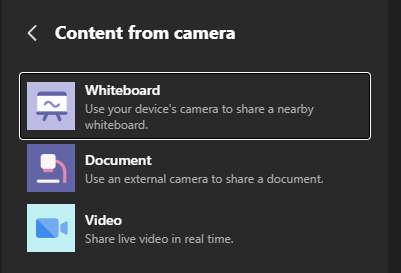
      Content From Camera

      Use a physical camera to share a physical whiteboard, document, or Live Video

      Microsoft Teams Share Screen Content From Camera ScreehsnotMicrosoft Teams Share Screen Content From Camera Screehsnot

      PowerPoint Live

      With Live Presentations in PowerPoint, audience members can see a presentation on their devices and read live subtitles in their preferred language while you speak. They can use “pinch to zoom” to see the slides more clearly on mobile devices, give feedback, send live reactions to the presenter, and navigate back to review previous slides.

      Microsoft Teams Share Screen PowerPoint Live Screehsnot